Decrease your withholdings so that you owe money at the end of the year. No refund, no fraud.
Use the IRS Withholding Calculator to figure out what numbers to enter in Form W-4.
Decrease your withholdings so that you owe money at the end of the year. No refund, no fraud.
Use the IRS Withholding Calculator to figure out what numbers to enter in Form W-4.

Equifax failed to install a security patch after it had been out for two months and got hacked, then failed to notice the hack for two months, then failed to notify the public about the hack for two months. This is obviously one of those WTF moments.
NPR has some tips on what to do to protect your credit: “After Equifax Hack, Consumers Are On Their Own. Here Are 6 Tips To Protect Your Data”
But the root of the problem is this: your Social Security number is used as both an identifier and as a means of authentication. Here’s an analogy: imagine a world where your email address was often both your username and your password. Maybe for some places it’s your username, and other places it’s your password. Stupid, right?
Like it or not, the credit reporting agencies are protected by the First Amendment. So you can’t wipe them out of existence. They also provide a pretty valuable service by providing lenders with a history of your ability to pay your bills so that you can get access to money you haven’t saved.
However, Congress could put in place restrictions on when and how the credit reporting agencies can share this data. This “free speech zone” for credit history could require that the agencies first establish a means of authentication so that only authorized entities could access your credit history. In other words, let’s assume that your Social Security number is out there in public as your username. And the credit reporting agencies need to establish some kind of password with you that you will then use on a case by case basis to unlock your history for a potential lender, employer, or landlord. It’s like when you agree to share your Facebook profile with some iPhone game to unlock some virtual currency. You’re in control of the transaction, your data is secure, and the only thing changing hands is permission to access the information.
Image CC BY Juho Metsävuori
Five policies and programs to spur business creation and hiring:
Corporate Income Tax
Eliminate it. It’s double taxation. If you want to tax rich people, tax rich people. More importantly, it leads to shenanigans like tax inversions, keeping cash overseas, and looking for crazy legal loopholes to reduce taxes. This system favors large companies over small companies, international companies over domestic companies. Kickstart the creation of new companies by eliminating the corporate income tax.
Universal Health Care
Implement it. Give every aspiring entrepreneur the freedom to start their own thing without worrying about not getting the health care they need or going bankrupt getting it. Take the burden of providing insurance away from companies, where insurance costs can be a significant percentage of the cost of labor. Give every employer a discount on new hires by removing this cost.
Payroll Taxes
Eliminate them. They’re highly regressive, punitive for the self-employed, and ultimately a legal Ponzi scheme where current workers pay for old people’s basic income and medical insurance. Fund Social Security and Medicare out of the broader tax base, and stop arguing over when the Ponzi scheme is going to collapse. Once again, make it easier for employers to hire new workers without having to worry about these additional costs.
Universal Basic Income
Implement it. No means-testing, no applications, no judgment. Just a guaranteed Basic Income for being an adult US Citizen. When basic needs are met, people have more freedom to start new companies or new careers. At the same time, we can dramatically reduce poverty and focus on productivity.
Minimum Wage
Eliminate it. It’s a burden on businesses and ultimately leads to an increase in part-time work, just in time shift scheduling, and contracting out services to contractors. The goal behind the minimum wage is to ensure that low income workers have a basic level of income and quality of life, but this isn’t the right tool.
Five ways to pay for them:
Income Taxes
Add more brackets. Under the current system, $250k is taxed at the same rate as $500k, $1m, and so on. Adding additional brackets and higher rates at those brackets will make the tax code more progressive, ensuring that those who benefit most from our society also contribute the most.
Capital Gains Taxes
Increase them. Introduce brackets to ensure savers in the 99% aren’t taxed at the same rate as C-level executives in the 1%, but let’s drop this charade that they money made through stock, options, and other means of compensation isn’t the same as income.
BAT or VAT
Implement one or both. Either the Border Adjustment Tax or Value Added Tax will generate revenue based on economic activity in a more equitable manner, and should favor companies that make and sell stuff here in the United States.
Social Welfare Programs
Eliminate the transfer programs. Welfare (TANF), Food Stamps (SNAP), and Disability (SSDI) are all intended to provide cash assistance to people in need, but come with strict rules, differing qualifications, and a sense of shame. They’re also subject to shenanigans by the states (TANF dollars going to relationship classes and abstinence education). Universal Basic Income eliminates overhead, fraud, and abuse, and lets people make decisions about how best to spend their own money, whether that’s paying the utilities, getting a degree in nursing, or investing in some business equipment.
Deductions
Drastically scale back and phase out deductions. Deductions favor homewowners over renters, parents over the childless, religious people over the non-religious, the wealthy over the poor. It’s hidden spending and it’s a wasteful tool for social policy. If you want to encourage buying a house, installing solar panels, having children, set aside funds for each goal and ask people to apply for those funds, then deposit the funds in their Universal Basic Income account. Measure and examine the effectiveness of each policy each year and decide whether to do it again the next year. Don’t make this kind of spending universal, perpetual, and expected.
The Reality
Both parties and most taxpayers will likely reject different parts of this plan. It will never get anywhere.
Image CC BY John St John
Two-thirds of all sites have potentially been bleeding your login and personal information. If you’re like most people, you’ve been using the same email address and password for most sites, so now you’re really screwed. Now seems like a good time to take some steps to protect yourself.
Use More Than One Email Address
I have a longer post that I wrote several years ago ( Five Email Addresses), but basically you need an email address for people, for work, for money, for shopping, and then everything else. That way a hacked account on some third rate site won’t immediately put your bank and credit card accounts at risk.
Use a Password Generator and Keeper
There are a bunch of these like 1Password and LastPass that will allow you to generate strong passwords (20+ characters made up of mixed-case letters, numbers, and symbols) and remember them for every single site. You can sync them across multiple computers and devices, so you really don’t have an excuse for using the same weak password for every site.
Start changing your passwords, but judiciously
Since the news broke a number of sites have already patched the vulnerability; others were never at risk from this particular hole. Still, there may be sites out there that are still vulnerable to Heartbleed. Changing your password on any of them would still leave your account vulnerable. Check to see if your favorite sites are on Mashable’s hit list or test them yourself at http://filippo.io/Heartbleed/.
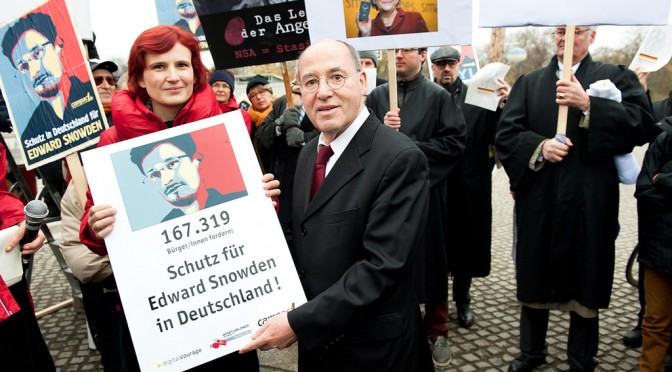
One of the striking things about this whole thing is how young Edward Snowden is. I thought it might be interesting to put some things into context.
1983 – Snowden born.
1998 – Snowden is 15 years old. COPPA and DMCA enacted. Google founded.
2001 – Snowden is 18 years old. Terrorists hijack airplanes and attack New York’s World Trade Center and the Pentagon.
2004 – Snowden is 21 years old. Snowden enlists in the Army, and is discharged following a training accident. Facebook founded.
2005 – Snowden is 22 years old. YouTube founded.
2007 – Snowden is 24 years old. Protect America Act enacted. PRISM begins. iPhone launched. Microsoft joins PRISM.
2008 – Snowden is 25 years old. FISA Amendments Act of 2008 enacted. Yahoo! joins PRISM.
2009 – Snowden is 26 years old. Google and Facebook join PRISM.
2010 – Snowden is 27 years old. YouTube joins PRISM.
2011 – Snowden is 28 years old. AOL and Skype join PRISM.
2012 – Snowden is 29 years old. Apple joins PRISM.
2013 – Snowden leaks classified documents about PRISM to the Guardian and the Washington Post and goes into hiding in Hong Kong.
I looked most of this up on Wikipedia, so it must be true.
Image CC BY Fraktion DIE LINKE. im Bundestag